Learn AI with Zain Qurashi  ·  Day one lab, free  ·  About an hour
DRIP.

Day one lab  ·  Level 0  ·  free

Build your own dictation tool tonight.

Hold a key, talk, get text. People pay $12 to $30 a month for this. You'll build the first version in about an hour by describing it to an AI, measure it honestly, and see exactly where it ends up. No Python, no setup, nothing to install.

works in Chrome or Edge on a laptop. a free key makes it work everywhere, step 2.

What the shops charge

Wispr Flow$15 / mo
Typeless$30 / mo
The one you build tonight$0
The one you build in the Lab (Scribe)$0, forever
List prices on Oct 2, 2026; both drop to $12 on annual plans. They're good tools. The point is that you can build one, and learn how it works on the way.

Rung 0, finished  ·  this is what you're about to build

Try it. Hold the button and talk.

This is my version of the first rung, built the same way you will: by describing it to an AI. Everything you say stays in this browser; the history below is yours. With no key it uses your browser's built-in recognition (Chrome or Edge). With a free key from Groq it works in any browser and can clean up the text.

This session

0words
0.0 slast latency, release to text
0:00time speaking
0 minsaved vs typing at 40 wpm
0clean-up tokens
this browserwhere your voice went

Your notes, yours

  • Your last 20 dictations will show here, saved only in this browser.

The build  ·  about an hour

Now build yours. The way everyone builds their first one.

You don't write code tonight. You describe the tool to an AI, save what it gives you as a file, open it, and paste any error back. That loop is the lesson. Use Claude, ChatGPT or Gemini; it doesn't matter which.

1

Describe it. Save it. Open it.

Copy this into your AI. Save the reply as a file called dictate.html (in VS Code or Notepad), then double-click it to open it in Chrome or Edge.

Make me a single HTML file called dictate.html with no external libraries. A big button I can hold down (mouse, touch, or the space bar) to dictate using the browser's built-in speech recognition (webkitSpeechRecognition). While I hold it, show the words as they arrive. When I let go, put the final text in a text box with a Copy button and a Clear button. Keep a list of my last 20 dictations with timestamps in localStorage, with a button to clear it. Show a counter: words this session, and how many seconds the last dictation took from release to final text. If the browser doesn't support speech recognition, say so and suggest Chrome or Edge. Plain, readable code with comments, dark theme.

If it doesn't work, paste the error message (or "the button does nothing") back to the AI and try again. Two or three rounds is normal.

2

Add a free key, so it works everywhere and can clean up.

Make a free account at console.groq.com (no card) and create an API key. Then paste this to your AI:

Add an optional key mode to dictate.html. A settings area where I paste a Groq API key, stored in localStorage, with a visible warning that this is only okay for a personal tool on my own computer. When a key is present: record audio with MediaRecorder while I hold the button, and on release send it as multipart form data (fields: file, model=whisper-large-v3-turbo) to https://api.groq.com/openai/v1/audio/transcriptions with the key as a Bearer token, then show the text. Add a "Clean up" button that sends the text to https://api.groq.com/openai/v1/chat/completions with a model chosen from a dropdown filled from GET https://api.groq.com/openai/v1/models (skip models whose id contains whisper or tts), asking it to fix punctuation and capitalization, remove filler words, keep my meaning, and return only the text. Show the tokens used from the response's usage field and keep a running total.

Now it works in any browser, the accuracy goes up, and you can see what clean-up costs in tokens.

3

Measure it. Keep the receipts.

Read the test paragraph below into your tool, count the wrong words, note the latency, and fill in the scorecard. You'll fill in the same scorecard again at rung 1 and rung 2, and the gap will be yours.

  • Post your numbers under the lab on YouTube or in the Lab when it opens.
  • Keep the file. Rung 1 starts from it.

What yours will be bad at

  • Browser mode needs Chrome or Edge, and sends your voice to Google's servers.
  • It clips the first word if you talk the instant you press.
  • No clean-up without a key: every "um" stays.
  • It's a web page, so the text doesn't land in other apps. You copy and paste.
  • Key mode is better, and still cloud: your voice goes to Groq.

What that's teaching you

  • What an API key is and why it must never ship inside a product.
  • Why a memory buffer exists (so the first word survives).
  • Where your data goes, and what "runs on your computer" is worth.
  • What a clean-up model costs per thousand words.
  • That the first version always works and is always bad. Engineering is the rest.

The scorecard  ·  fill it in before you leave

Your numbers, next to where it ends up.

The test paragraph · 100 words · read it in one go, no pause before the first word

Hi, this is a quick test of my dictation tool. My name is Maya Patel and I work with Jordan Reyes on the Tuesday report. We ship about 240 orders a week, and the API that tracks them goes quiet around noon. Yesterday I said the first word too quickly and the tool missed it. Numbers like 3.5 and names like Okonkwo are the hard part. If this comes back with every word, the punctuation in the right place, and nothing invented, the tool is better than most. Stop recording right after the last word, with no pause at all.
MeasureHowRung 0, yoursRung 2, Scribe (mine, measured)
Wrong wordsout of the 100 in the paragraphmeasured in the Lab, on the same paragraph
Latencyseconds from release to text; the tool shows it0.92 s median
Cost to runper 1,000 words: the speech API's price plus clean-up tokens. Free tier = $0 today; write the list price$0, runs on your computer
Cost to buildtokens or dollars your AI used, from its usage screenabout 25,000 lines, with tests
Where the voice wentcloud, or your computeryour computer, nothing leaves it
First word survived?did "Hi" come throughyes: the mic rewinds a third of a second
Pacewords a minute while speaking; the tool's counters give it to you160 wpm average, best session 245
Time saved so farthe tool's "saved vs typing" counter10.4 hours over 342 sessions
saved in this browser only. nobody sees it unless you post it.

Where it ends up

Here's yours. Here's rung 2.

Same tool, three times. Each rung fills in the same scorecard, so you watch your own numbers move. Rung 1 is free. Rung 2 is the app I use every day, and the Lab builds it with you.

Rung 0 · tonight · free

The web page

  • One HTML file, built by describing it
  • Browser recognition, or Whisper on a free key
  • Your voice goes to the cloud
  • Clips the first word
  • Copy and paste into other apps
Rung 1 · next · free

On your own computer

  • About 300 lines of Python
  • Speech to text runs locally (whisper.cpp)
  • A hotkey that works in any app
  • Clean-up through a model, tokens measured
  • A lesson that shows your voice becoming numbers, then a spectrogram, then words
Send me rung 1
Rung 2 · the Lab

Scribe

  • Speech to text on your GPU, a local model for clean-up: nothing leaves the computer
  • The mic rewinds a third of a second, so the first word never clips
  • A writing style per app: chat, email, code
  • Notes, history and stats: everything you've said, searchable, yours
  • Members get the finished app the day they join, then build it
Unlock in the Lab

Why I built mine

Everything you say is data. It should be yours.

When you talk to a chatbot, your ideas live inside its history, on its servers, in its format. Dictation is different: you're producing your own notes all day, in your own words. Kept on your computer, they're searchable, they show you what you keep coming back to, and you get better at saying it.

That's what Scribe's stats page is: 77,000 words in a month, which apps they went to, how fast I talk, how much time it saved. Mine, measured, on my machine. You start that tonight with the history list in the tool above.
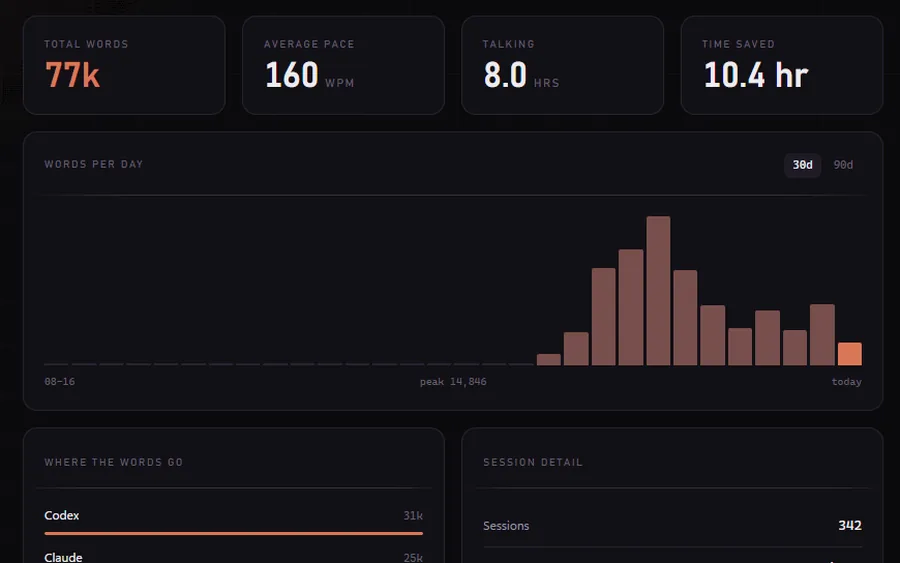
Scribe's stats screen: 77k words, 160 words a minute, 10.4 hours saved, a words-per-day chart.

Keep going  ·  free

Rung 1 is free. I'll send it when it's ready.

Leave your email and you'll get rung 1 (the version on your own computer), the nine-level roadmap, and a note when the Lab opens. You don't have to buy anything to keep building this. Run wild with it.

free. rung 1, the roadmap, then the odd next step. no spam, and you can leave from any email.