Learn AI with Zain Qurashi  ·  Start free  ·  The Lab when you want the full builds
DRIP.

Drip the Cup Lab  ·  taught by

Zain Qurashi

Nine levels from zero to AI integrations engineer.

With nothing connected, AI can only talk. Connected to a company's email, files and systems, safely, it does real work. Connecting it is the integrations engineer's job, and it's been mine for ten years.

three ways in. pick one; the details are right below.

Zain as a 3D character at a desk, typing on a laptop while Drip, a small paper coffee cup character, waves from the desk.

The Lab  ·  $49 a month  ·  optional

The full builds, a plan for your level, and me.

Two tracks. The enterprise labs teach the job: AI connected to a company's systems, safely. The personal builds are real apps I use every day, built on my own time since June. In the Lab you get both, and we build them together.

Track 1  ·  Enterprise labs  ·  the job

Build a company on real tools. Then wire AI into it without making the security team nervous.

Every episode happens inside one company you set up yourself, on the tools real companies run, using free tiers and sandboxes. Fake staff, customers and invoices; real Okta, Slack, Airtable, HubSpot and QuickBooks. You roll out Claude and ChatGPT, build the automations every company needs, then agents, then the security around them: who the agent is, what it can see, what it can change, and proof of what it did. Thirty-one episodes, one system you can demo end to end.

AThe company 2 episodesSign up for the real tools a normal company runs: Okta, Slack, Airtable, Gmail, HubSpot, QuickBooks, Stripe. Then SSO, with groups as the permissions.
BRoll out Claude and ChatGPT 4 episodesWhich plan, SSO, company skills and connectors, read allowed and send blocked, the AI policy, and shadow AI.
CAutomations 10 episodesNew hires and leavers provisioned by group, access requests approved in Slack, Airtable to Slack, email into Airtable, payments to the CRM, bill approvals, the Monday report.
DAgents 4 episodesThe same agent built three ways, from no-code to code. A team agent in Slack. Agents that use your automations as tools. Coding agents, locked down.
EMCP and your own proxy 6 episodesA read-only MCP server, writes that wait for approval, an agent that acts as the user, your own MCP proxy, logs of everything, and attacks you fix.Signature
FThe stacks companies buy, and shipping it 5 episodesCopilot Studio, AWS Bedrock AgentCore, cost limits and a kill switch, tests on every change, and the rollout review a security team asks for.

Almost all free: developer sandboxes and free tiers, with n8n on your own computer for the automations. The paid part is a Claude and a ChatGPT business seat for the rollout episodes. NetSuite has no free login, so finance runs on the QuickBooks sandbox and every step is mapped to NetSuite.

Track 2  ·  Personal builds  ·  the tools I use every day

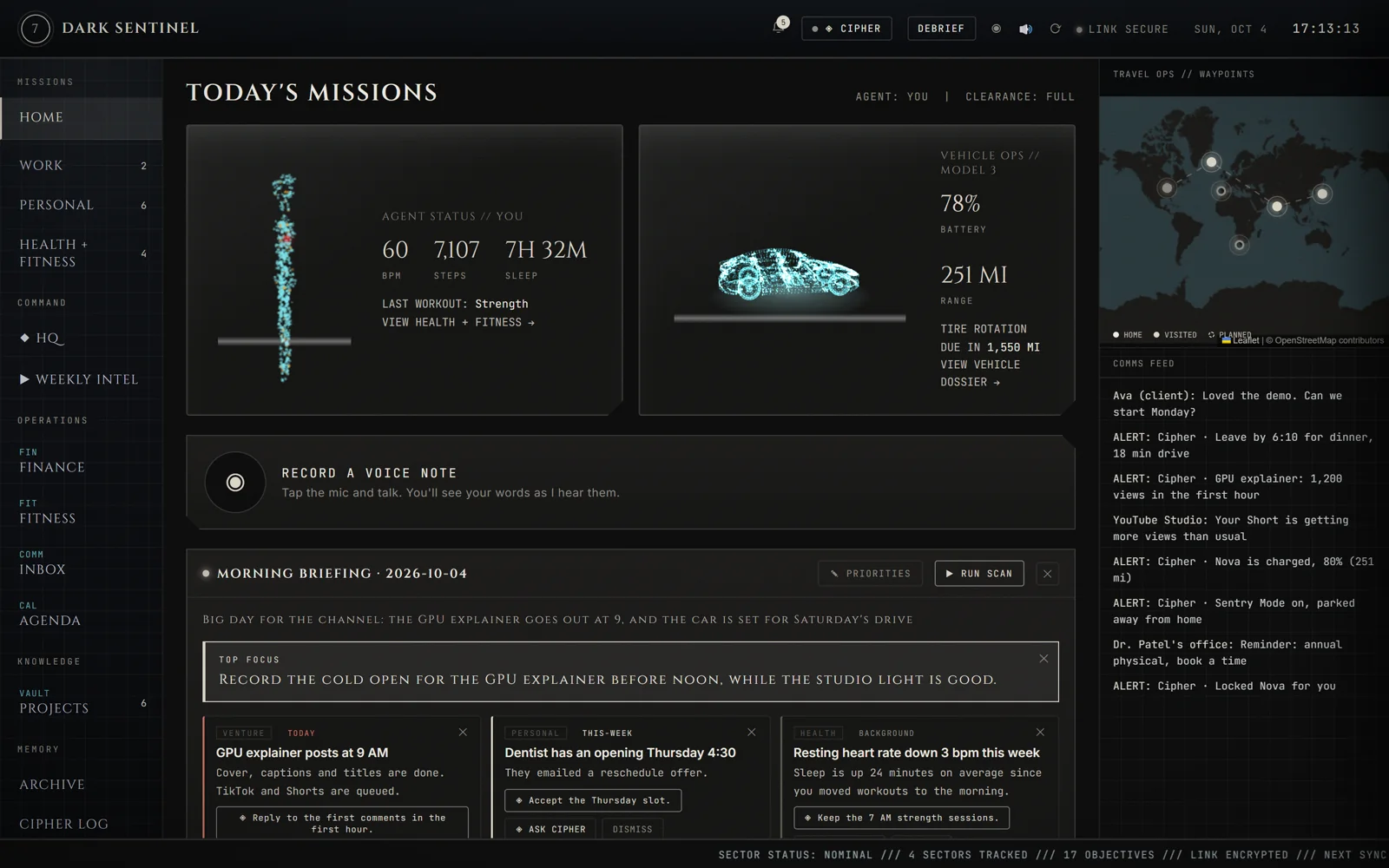
Mission Briefing's home screen: a body scan with heart rate, steps and sleep, a holographic Tesla with battery and range, the morning briefing and an alerts feed. Demo data. Demo data Unlock in the Lab
In daily use

Mission Briefing

My own 007-style command center. One screen for my Tesla, my health, my calendar and inbox, my money, and every project I'm building. An agent called Cipher briefs me each morning.

Every bank, card and loan connects in, and the data lives on my computer, not in someone else's app.

Working

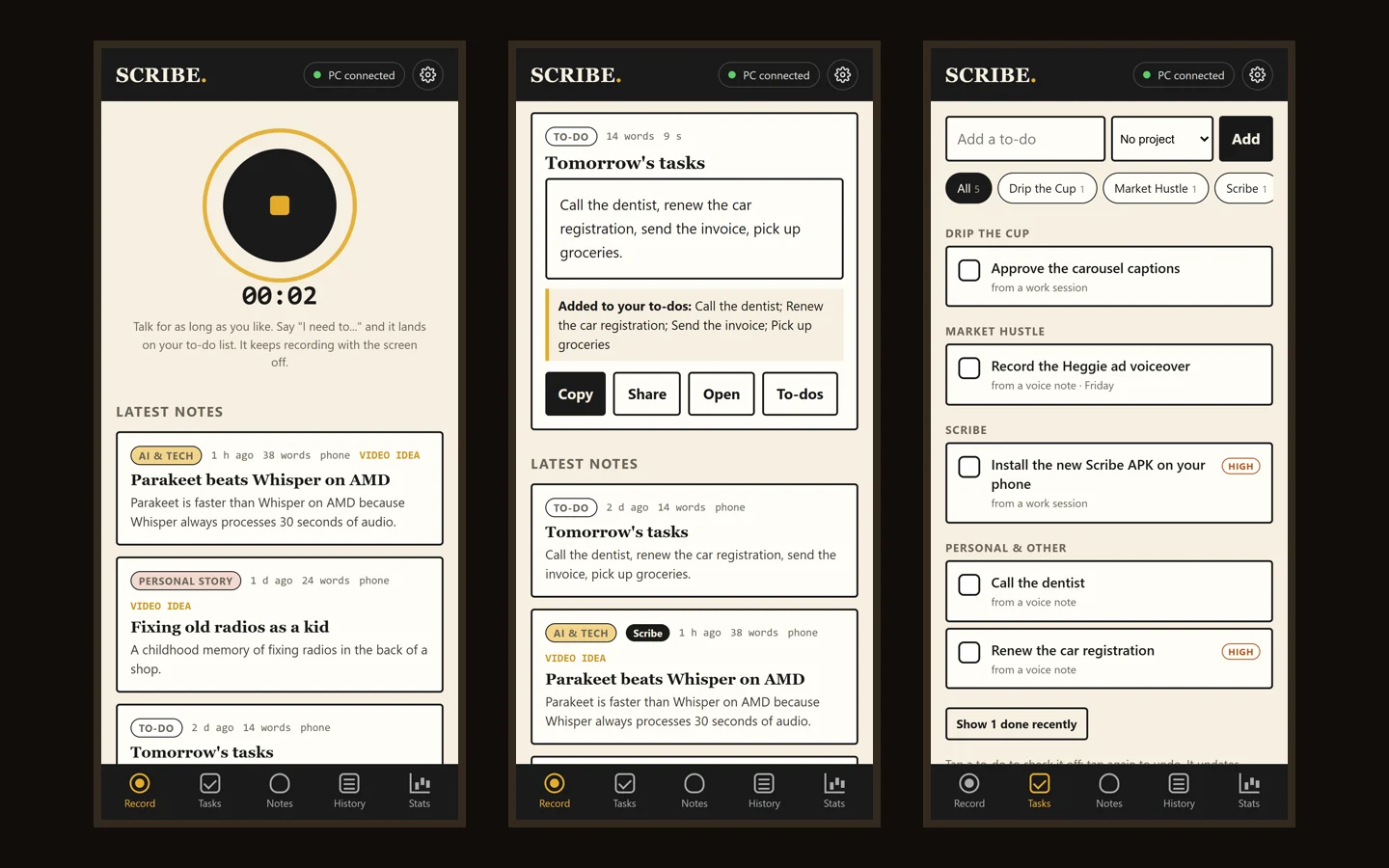
Scribe

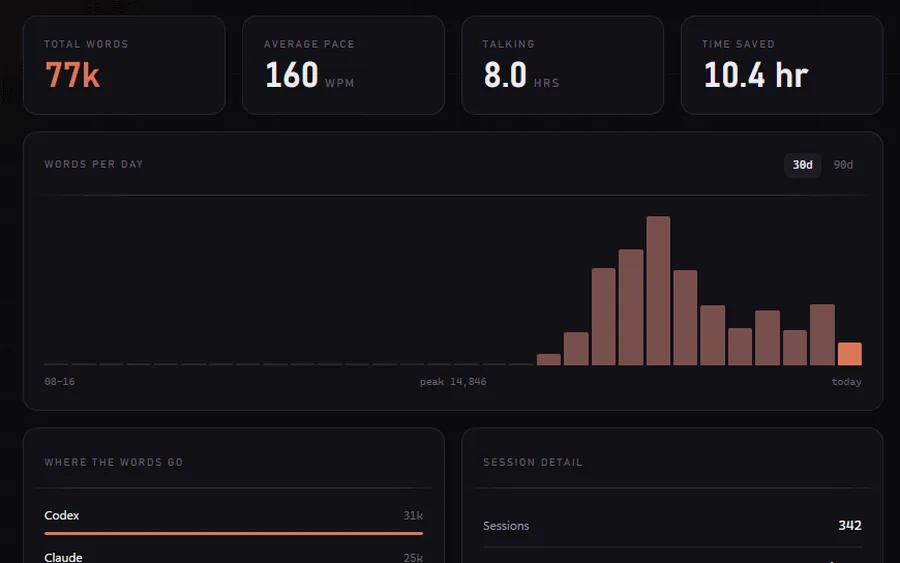
My own private dictation app, on my computer and my phone. Talk, and clean text lands wherever your cursor is, or comes back as a clean note with your to-dos. It also measures how you speak, from pace to how casual you sound, and coaches you on it.

In the Lab: the desktop app and the phone app, yours to keep.

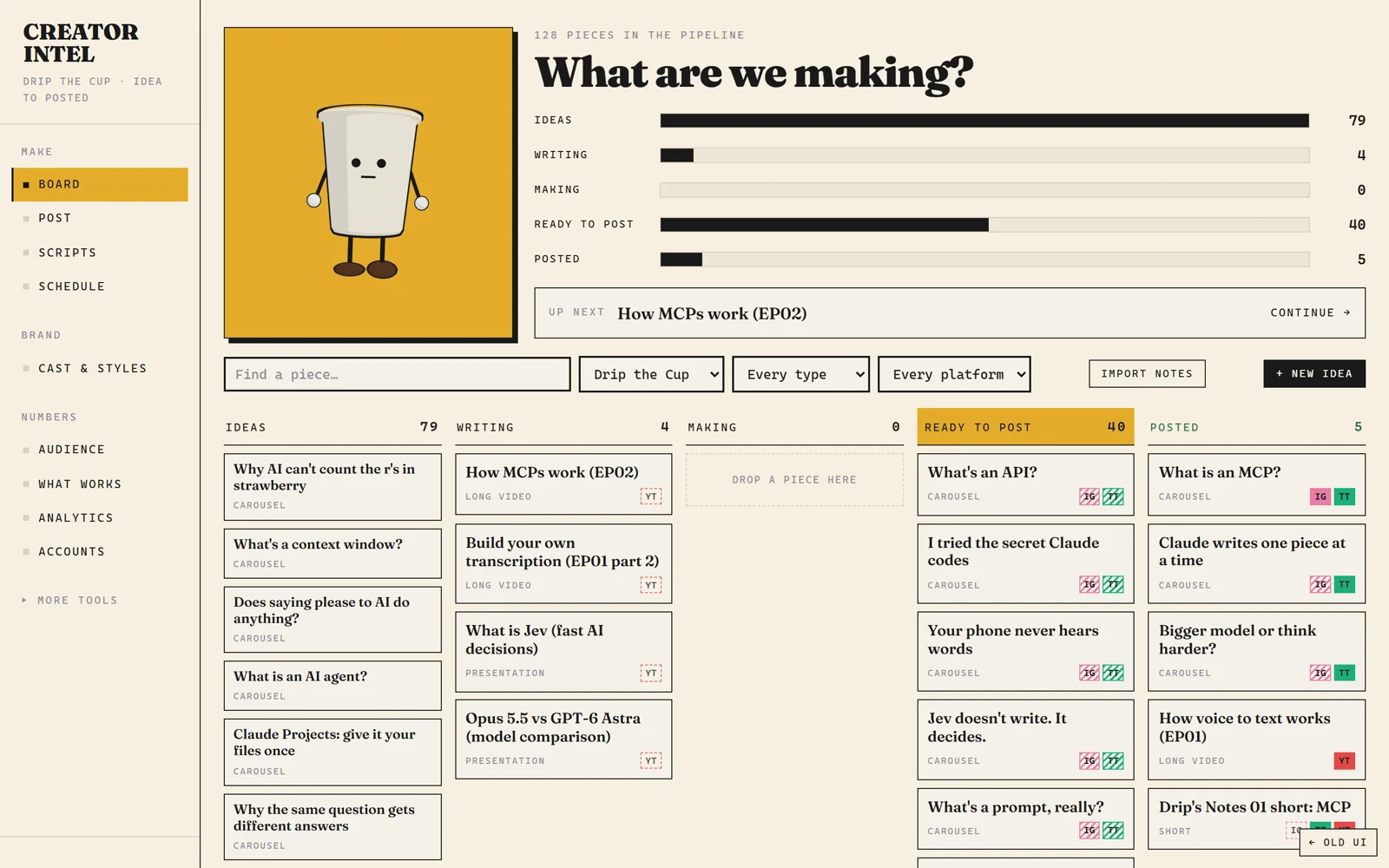
Creator Intel's board for Drip the Cup: ideas, writing, making, ready to post and posted. Real numbers · my channel Unlock in the Lab
Working

Creator Intel

Reads every post I make on YouTube and TikTok, compares each one to my own usual, and spells out what's working and what isn't. Then it writes that into a skill Claude reads before we brainstorm. Every idea sits on one board, and a plan from a chat drops straight onto it.

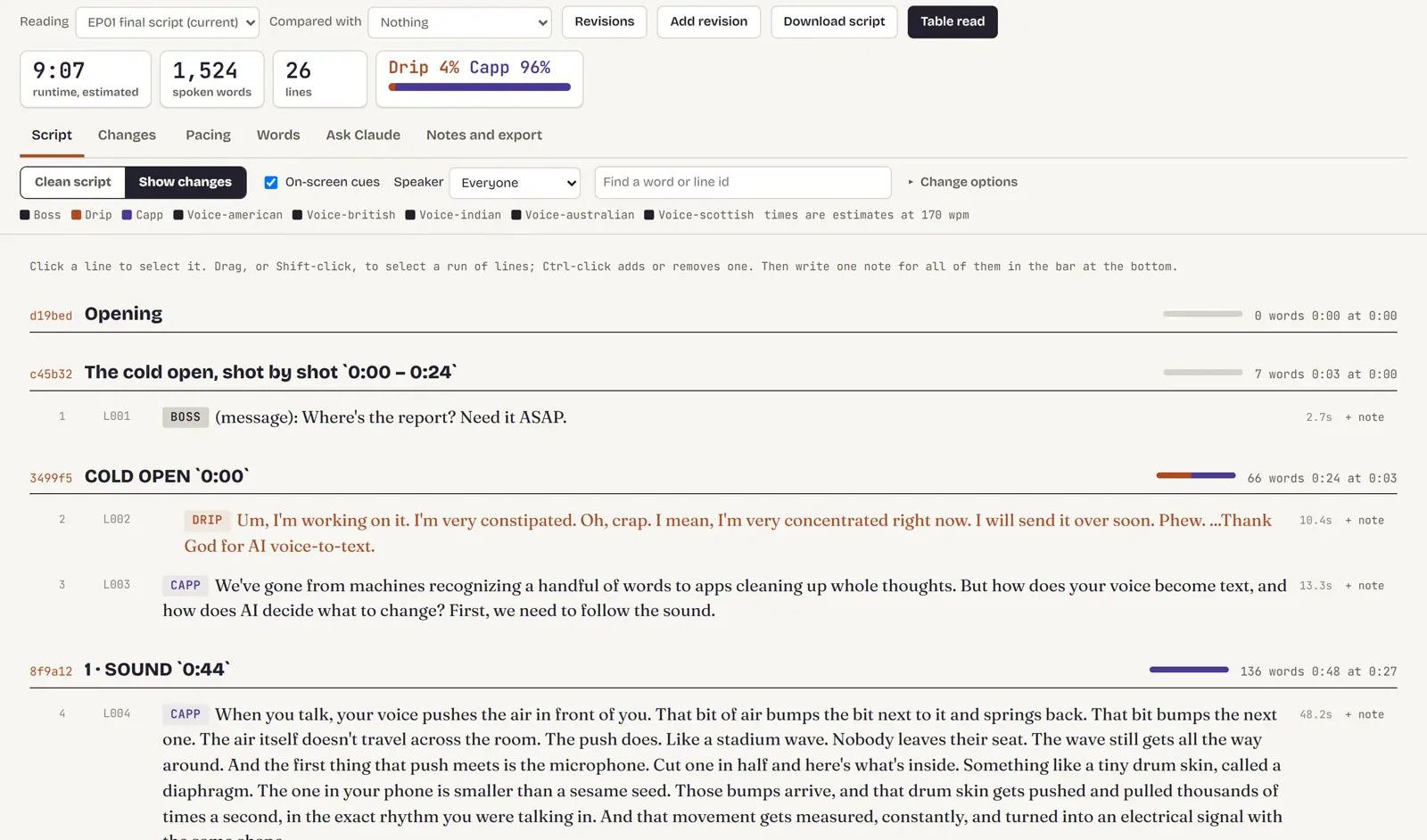
The Script Desk on the EP01 script: 9:07 estimated runtime, 1,524 spoken words, who speaks how much, and the script line by line with notes. Inside Creator Intel Unlock in the Lab
Used daily

The Script Desk

Every script, line by line: estimated runtime, who talks how much, revisions side by side, a note on any line, and a table read before anything gets voiced.

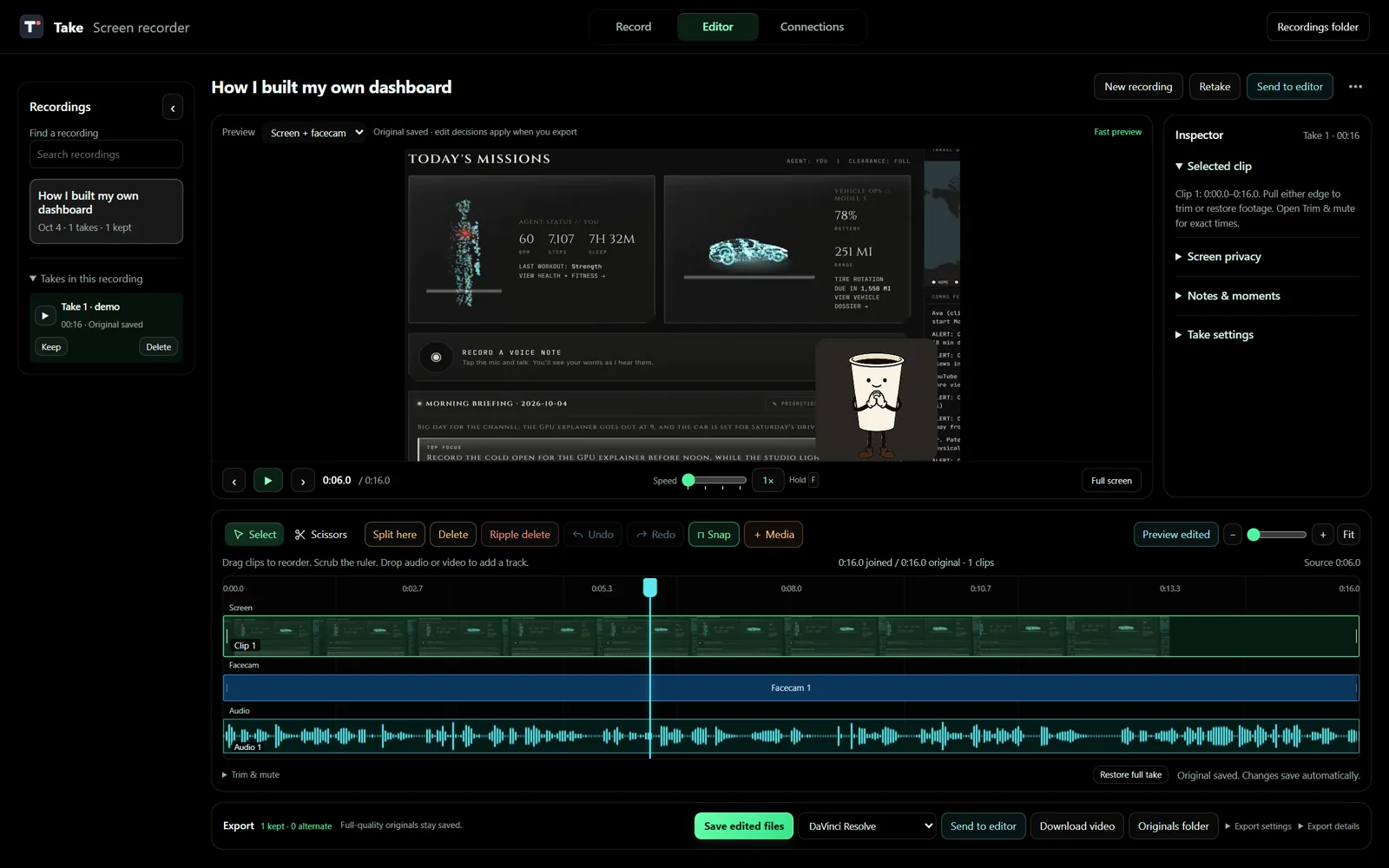
Take's editor: a recording of the Mission Briefing demo with Drip as the face cam, the timeline with screen, face cam and audio tracks, and export to DaVinci Resolve. Test recording Unlock in the Lab
On my desktop

Take

My own screen recorder and editor. Screen, face cam and mic record as separate layers, and anything private gets covered or blurred in the export. It flags repeated intros and long pauses, cuts on a timeline, and hands the edit to DaVinci Resolve with every layer on its own track, or to CapCut and Premiere.

Used daily

The Drip & Capp studio

Every Drip episode, short and carousel is rendered from code: AI voices, animation timed to every word, about 160 scenes.

    What you get

    • Thirty-one enterprise episodes. A company on real tools, the Claude and ChatGPT rollout, ten automations, agents, your own MCP proxy, Copilot and AWS, and the rollout review.
    • The full builds. Mission Briefing, Scribe, Creator Intel and the Drip & Capp studio as step-by-step courses, with the code and the agent skills.
    • Apps you keep. Take and Scribe, yours to use.
    • A plan for your level. Where you are on the nine levels, and what to build next.
    • Two live calls a week. A build-along and a Q&A, plus reviews of your builds and your portfolio.
    • A small group. Seeded with working engineers, so questions get real answers.

    What you won't get

    • Certificates
    • A lifetime tier
    • Upsells inside
    • Income promises

    Founding rate

    $49a month, or $490 a year. The first thirty keep this rate for as long as they stay. Cancel any time.

    no payment now. you hear first when it opens on skool, and you decide then. privacy

    Who's teaching  ·  Zain Qurashi

    AI didn't take my job. It got me promoted.

    I'm an integrations engineer. For ten years my job has been making systems talk to each other. In the last two, every request that lands on my desk starts the same way: can we put AI on this?

    So on my own time I built small proofs of concept, showed them, and they became the projects I was asked to focus on. That's the whole method: be curious, build small things that work, show results.

    It worked for me, and I want you to have the same map. Drip is proof it works outside the day job too: a cup of coffee that explains AI, run by a pipeline I built.

    10 yrsin tech, all of it integrations work
    13apps and tools built since June, on my own time
    13agent skills that run them
    $0to start. The path is free

    The path

    Nine levels. Zero to AI integrations engineer.

    Every level is a real thing you build, not a quiz. Levels 0, 1, 2 and 4 are free.

    ProgressLV 0 / 9
    0Start here: build your own dictation toolTonight, in your browser. Open the lab →Free
    1Curious: how AI talks to softwareA script that calls a model, every line explainedFree
    2Connected: AI that decidesA tool finder that ranks 200 AI toolsFree
    3Builder: connect AI to your appsYour first MCP serverLab
    4Integrator: voice and mediaDictation on your own computer; Scribe in the LabFree
    5Automator: automations and agentsRoll out Claude and ChatGPT, ten company automations, agents from no-code to codeLab
    6Shipper: AI at the enterprise levelYour own MCP proxy, agent identity, audit logs, attacks, Copilot and AWS, the rollout reviewLab
    7Engineer: portfolio projectsFour projects to show an employer or a clientLab
    8Architect: automating a characterThe Drip pipeline, the way a company would run itCase study
    9Legend: the careerResume, interviews, a twelve-month plan reviewed liveLab
    +Side quest: record, edit and make videos with AIMembers get Take, my screen recorderLab

    Before you ask

    Straight answers.

    Do I need to know how to code?

    Level 0 assumes nothing. By level 1 you'll be running small Python scripts, with every line explained in plain English. If you already code, skip ahead: the enterprise level and the portfolio projects are where you'll spend your time.

    What's the difference between free and paid?

    The free path is the start, and it stands on its own: the dictation lab, the roadmap, the AI tools directory, my public videos, and emails from me with the next step. The Lab is the structure on top: the full builds and their code, deeper videos made only for members, a plan for your level, live calls and reviews. The information should be free. What you pay for is the plan and the help.

    Will this help me get a job?

    I can't promise that, and anyone who does is selling something. I genuinely want you to get one. I'll show you what the job actually is, what I built to get ahead in mine, and how to put together a portfolio that proves you can do it.

    Do you work with businesses?

    Yes. I've spent ten years building enterprise integrations and workflow automations, and I set up AI systems and workflows for businesses. Projects start at $1,000, with a fixed quote after a free 20-minute call. Pick Work with me at the top of this page.